

Enhancing Customer Service Through UX Design & Strategic Audits

Brandhero Team

Learn how UX design and service audits cut friction, boost satisfaction, and drive growth with proactive, user‑centric strategies.
Customer service improvements drive real UX outcomes when you base them on design audits, behavioral data, and user journey mapping. An action plan means diagnosing friction points, prioritizing interventions, and making changes that cut resolution time while raising satisfaction.
Poor service damages brand equity faster than almost anything else. In 2026, users expect instant, empathetic support embedded into product experiences not tacked on as an afterthought. When service lags expectations, churn accelerates. This guide lays out an action plan grounded in UI/UX principles that transforms reactive support into proactive experience design part of our broader user experience optimization work.
Audit Current Customer Service Touchpoints to Identify Friction
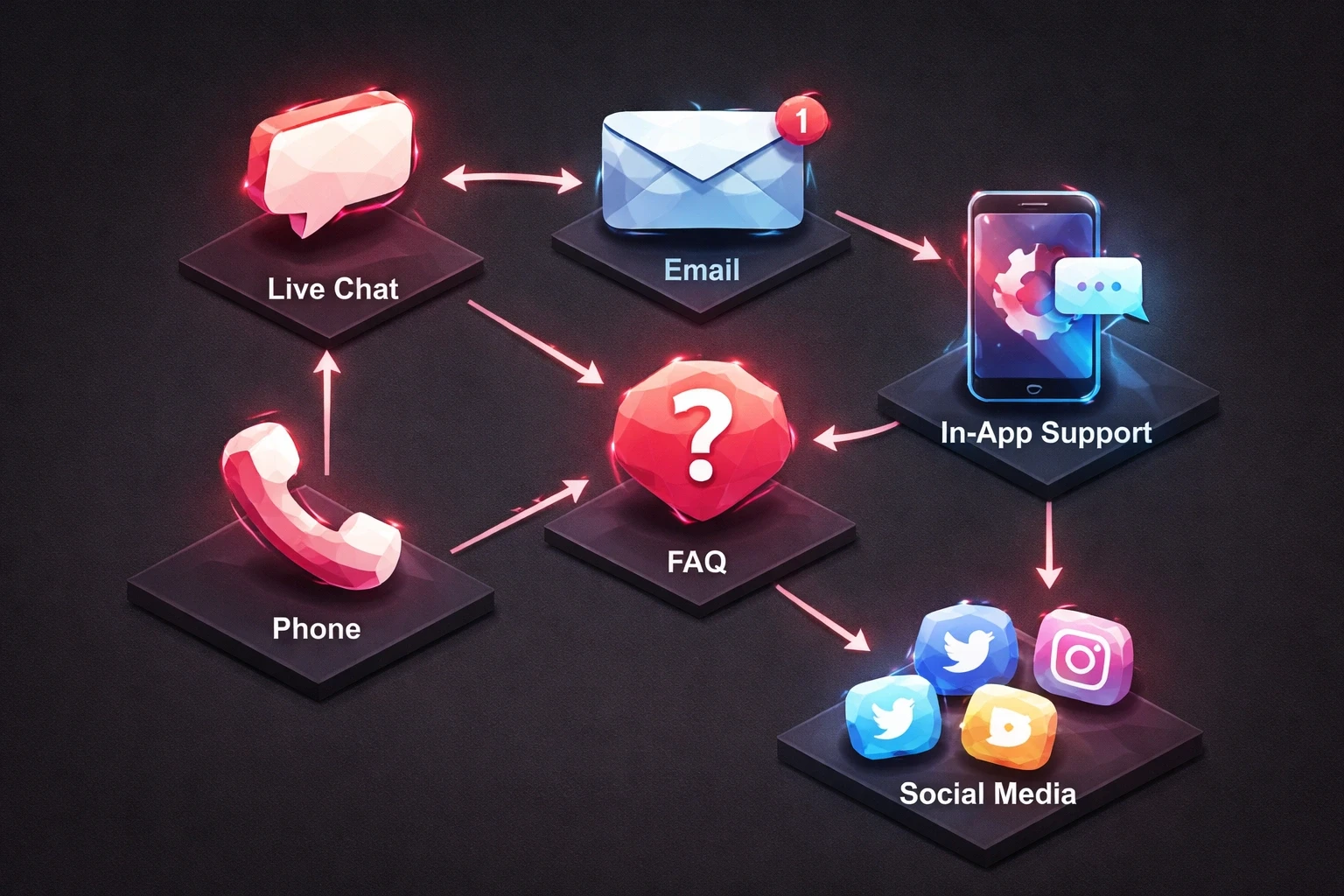
Friction shows up as delayed responses, unclear self-service paths, and disjointed channel experiences. Start with a touchpoint audit: map everywhere users seek help live chat, email, FAQ pages, in-app support, phone, social. Record resolution time, escalation frequency, and user sentiment for each.
Session recordings and heatmaps reveal where users struggle before they ever contact support. High bounce rates on help pages or repeated visits to the same article signal confusion. Track ticket topics to surface recurring issues. If 30% of tickets involve password resets, the authentication flow needs redesign not better documentation.
Run service blueprint workshops with support staff and product teams. These visual maps show backstage processes customers never see but that directly affect their experience. When agents lack tools to access user histories quickly or escalate efficiently, customers wait longer and satisfaction drops. User insights from behavioral analytics reveal where systems fail before users complain.
Calculate the cost of poor service: multiply average ticket volume by resolution time and agent hourly rate. Add lost customer lifetime value from churn caused by service failures. This baseline demonstrates ROI potential for UX investments.
Design Self-Service Paths That Reduce Support Demand
Self-service cuts ticket volume. It also empowers users to solve problems immediately. Contextual help at decision points prevents issues before they become support requests build in-app tooltips, progressive disclosure, and smart defaults that guide users through complex workflows.
Structure your knowledge base around user intent, not product features. Search query analysis shows the language people actually use when seeking help. Optimize articles for these patterns. Use schema markup to make help content discoverable in search engines.
Intelligent search within help centers should surface relevant articles based on user role, account history, and current context. A user on the billing page hitting an error should see payment troubleshooting not generic onboarding guides. Chatbots can triage common questions and route complex issues to humans with context already captured.
Video tutorials work well for multi-step workflows. Screen recordings with voiceover reduce cognitive load compared to text-heavy articles. Host these on your own domain to retain users.
Track self-service deflection rates: users who find solutions without contacting support. A/B test different help content formats and placements. A 10% reduction in ticket volume translates to real savings.
Redesign Support Interfaces for Speed and Clarity
Support interface design affects resolution time and frustration. Contact forms should request only essentials name, email, issue category, description. Each additional field increases abandonment. Use conditional logic to show relevant follow-ups based on issue type, not a wall of fields upfront.
Display estimated response times prominently. When users know they'll hear back within four hours rather than wondering if their message disappeared, anxiety drops and satisfaction holds even with some wait.
Live chat needs clear availability hours and queue position indicators. Nothing frustrates users more than starting a chat only to find no agents available. Show wait times and offer asynchronous options when queues get long.
Agent dashboards should surface customer context immediately: account age, subscription tier, previous tickets, recent activity. Agents with this information resolve issues faster without forcing customers to repeat themselves. Integrate support tools with CRM and product database to enable single-click actions like refunds or feature toggles.
Conversational UI patterns that mirror natural dialogue rather than rigid forms feel more human even when automated.
Train Teams on User-Centric Communication Protocols
Empathy and clarity build trust even when solutions aren't immediately available. Train support teams to acknowledge emotions first before troubleshooting. Phrases like "I understand how frustrating this must be" validate user feelings and reduce defensiveness.
Response templates maintain brand voice while allowing personalization but shouldn't read robotic. Agents need freedom to adjust tone based on context.
Tiered escalation paths with clear criteria help agents know when to involve specialists. Empower frontline staff to resolve common issues without approval bottlenecks. Authority to issue small refunds or extend trial periods immediately can turn detractors into promoters.
Internal documentation should match external help resources. When agents reference the same articles customers access, language stays consistent and users gain confidence in self-service. This also surfaces documentation gaps when agents repeatedly explain concepts not covered.
Measure team performance on resolution quality, not speed alone. Rushed interactions that don't fully address needs generate repeat contacts.
Integrate Support Data Into Product Development Cycles
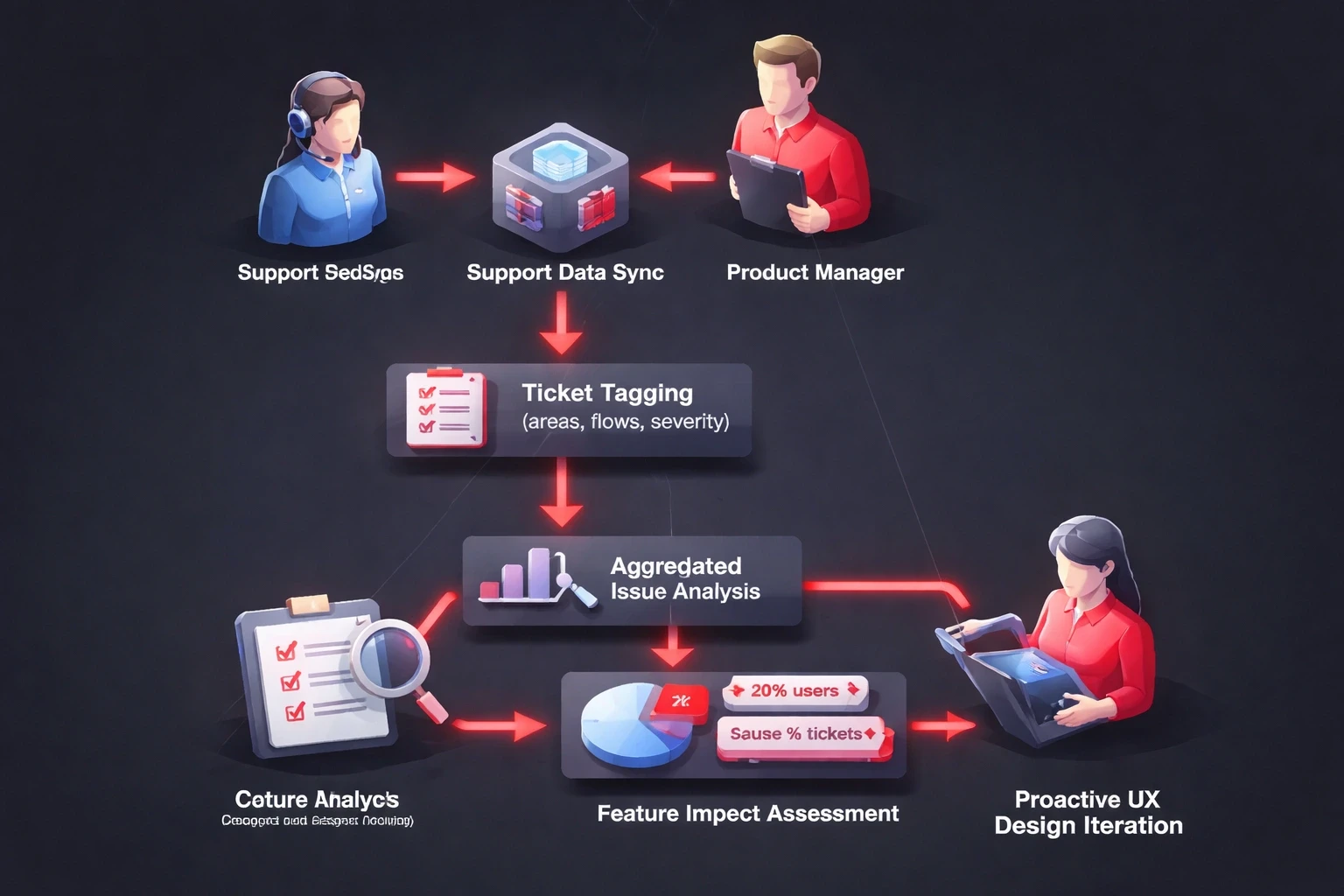
Customer service interactions contain product improvement signals often overlooked. Establish regular syncs between support leads and product managers to review trending issues, feature requests, and usability complaints. This transforms reactive support into proactive design iteration.
Tag tickets with affected product areas, user flows, and severity levels. Aggregate this data to identify which features generate disproportionate confusion. A feature used by 20% of customers but generating 50% of tickets needs urgent UX attention.
Joint sessions where product designers shadow support agents handling real inquiries build empathy. Designers often underestimate complexity or overestimate interface clarity until they watch users struggle firsthand.
Build feedback mechanisms into product interfaces that route comments to product teams without burdening support queues. Contextual feedback widgets asking "Was this helpful?" at task completion collect structured data while users are engaged.
KPIs that bridge support and product goals like ticket velocity and feature-specific contact rates create shared accountability.
Personalize Support Experiences Based on User Segments
Generic support wastes resources on high-value customers while under-serving those who need guidance. Segment users by subscription tier, account tenure, usage patterns, and support history.
Enterprise customers expect dedicated account managers and priority response times. Build tiered channels that route these users to senior agents with deeper product knowledge. Display VIP status in agent interfaces.
New users within their first 30 days need proactive outreach automated check-ins at onboarding milestones invite questions before frustration builds.
Power users benefit from direct access to product specialists and early feature previews. Recognize their expertise and use them as beta testers or community advocates.
At-risk users showing disengagement declining usage, failed payments, lack of activity need intervention before they churn. Automated workflows that flag these signals and trigger personalized re-engagement can make the difference.
Measure Service Quality Through UX Metrics That Matter
Traditional metrics like ticket volume and average handle time miss experience quality. Customer Effort Score (CES) asks users to rate how easy resolving their issue was on a 1-7 scale. Lower effort correlates with loyalty.
Track repeat contact rates within 7 days of ticket closure. High rates indicate incomplete solutions or unclear explanations forcing users to return.
Measure support NPS separately from product NPS to isolate service impact. Users might love your product but hate your support or tolerate product limitations because service exceeds expectations.
Calculate support-influenced revenue: customers who contacted support before upgrading or renewing. When support drives upsells, it's a revenue center, not a cost center.
Monitor channel preference shifts to understand where users want to engage. If chat grows while email declines, invest there.
Build Feedback Loops That Close the Service Design Gap
Service design improvement needs continuous feedback, not annual overhauls. Post-resolution surveys capture satisfaction while experiences remain fresh. Keep them brief three questions max to maintain response rates.
Quarterly retrospectives with cross-functional teams should review qualitative feedback, metric trends, and competitive benchmarking. Focus on systemic issues, not individual ticket post-mortems.
Customer advisory boards including users who've experienced both excellent and poor service inform roadmap priorities with real-world validation.
Share service insights transparently through product updates acknowledging known issues and planned improvements. This builds trust and reduces duplicate tickets.
Case studies showcasing service improvements with before/after metrics justify continued investment.
Implement Proactive Support Before Users Request Help
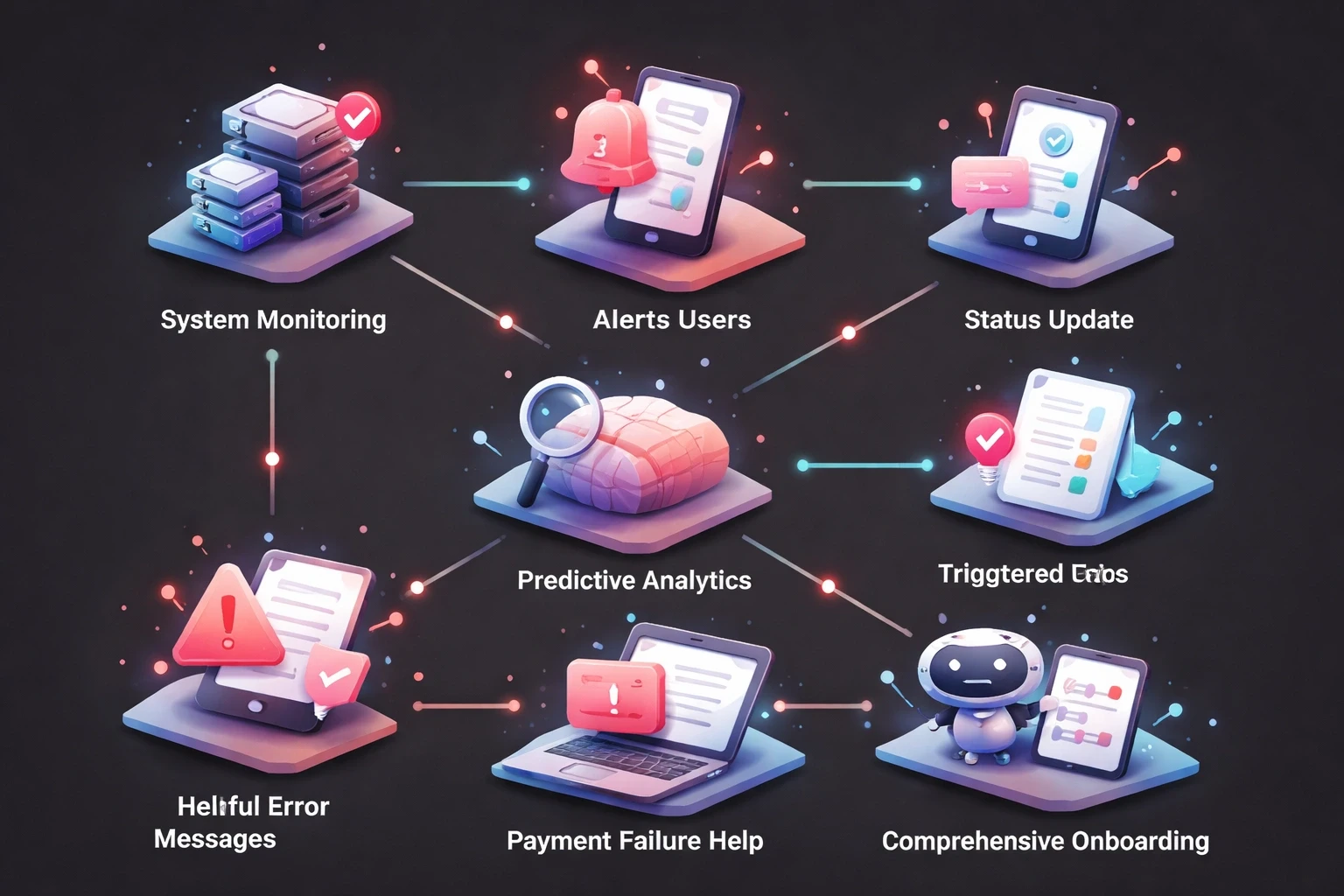
Proactive support identifies and resolves issues before users recognize problems. System monitoring that detects degradations can automatically notify affected users with status updates and workarounds.
Predictive analytics identify users likely to encounter specific issues. If data shows users who perform Action A often struggle with Feature B, trigger educational content after Action A completion.
Error messages should include solutions, not just descriptions. When payment fails, explain potential causes with specific next steps for each scenario.
Comprehensive onboarding sequences that anticipate common confusion points reduce early-stage friction when patience is lowest.
Transform Support into Community-Driven Resources
User communities reduce support burden while building engagement. Peer-to-peer forums enable experienced users to assist newcomers, scaling capacity without proportional cost increases.
Gamify participation with reputation systems and contributor spotlights. Many users prefer community solutions because responses arrive faster and often include workarounds official documentation misses.
Super-users who create tutorials and integrations extend product value. Feature these resources in official channels.
Monitor community sentiment to detect brewing issues before ticket volume spikes. Sudden forum activity around specific topics signals confusion needing official response.
Office hours and AMAs where product teams engage community members humanize your brand while efficiently addressing multiple questions.
Scale Support Without Proportional Cost Increases
Sustainable models maintain quality as user bases grow without linearly increasing headcount. Automation handles repetitive tasks; humans focus on complex interactions requiring judgment.
Tiered support with graduated response times based on complexity and customer value prevents expectation mismatches.
Agent productivity tools unified workspaces, keyboard shortcuts, macros reduce context switching and accelerate routine responses.
Outsourcing tier-1 for basic inquiries while retaining technical support in-house controls costs while ensuring expertise remains accessible.
Monthly content sprints addressing top unresolved search queries systematically reduce ticket generation.
Strategic partnerships with agencies like Brandhero Design that specialize in customer experience design can accelerate improvement.
Align Support Excellence With Business Growth Metrics
Customer service impacts revenue, retention, and acquisition efficiency. Map support quality to business KPIs to secure executive buy-in.
Track Net Revenue Retention segmented by support satisfaction. High-touch customers with positive experiences often expand usage faster.
Monitor CAC payback periods relative to early support interactions. Users receiving effective onboarding reach productivity faster. Early negative experiences extend payback or trigger churn before recovery.
Measure referral rates among support-engaged users. Exceptional service creates promoters who recruit customers at zero acquisition cost.
Support quality also signals product-market fit. When tickets involve feature requests rather than basic confusion, you've achieved core usability. When tickets concentrate on workflow struggles, fundamental design work precedes growth investments.
This plan transforms customer service from cost center to competitive advantage. The case studies in our portfolio show how strategic support design compounds with broader UX optimization strategies to drive measurable growth.
Explore all blogs
Jun 18, 2026
Enhancing Customer Service Through UX Design & Strategic Audits
Enhancing Customer Service Through UX Design & Strategic Audits

Jun 16, 2026
User Insights: Unlocking Design Decisions with Data
User Insights: Unlocking Design Decisions with Data

May 31, 2026
User Experience Optimization: Boost Conversion & Retention
User Experience Optimization: Boost Conversion & Retention

May 31, 2026
User Experience Optimization: Fixing Friction for Growth
User Experience Optimization: Fixing Friction for Growth

May 11, 2026
Phone Number Chunking: Reduce Errors & Improve Conversion Rates
Phone Number Chunking: Reduce Errors & Improve Conversion Rates

May 9, 2026
Mastering Gating in UI/UX Design: Convert Without Pushing
Mastering Gating in UI/UX Design: Convert Without Pushing

May 7, 2026
Gestalt Laws Explain Visual Grouping for Designers
Gestalt Laws Explain Visual Grouping for Designers

May 6, 2026
Checklist for Evaluating Microinteractions in UX
Checklist for Evaluating Microinteractions in UX